

Generates various barcodes ( Codabar, Code 39, GS1, Code 93, Code 128, EAN-13, EAN-8, JAN-13, Bookland, UPC-A, UPC-E, Postnet, PDF417, Truncated PDF417, DataMatrix, QR Code) and exports them to PNG, JPG, TIFF, and GIF. Supports encoding selection as well as batch processing.
Bytescout BarCode Generator is exactly what its name suggests: a tool for generating and exporting barcodes on your Windows PC. It features a very intuitive interface and easy-to-configure output settings, supports various barcode formats, and provides you with the results you need within moments.
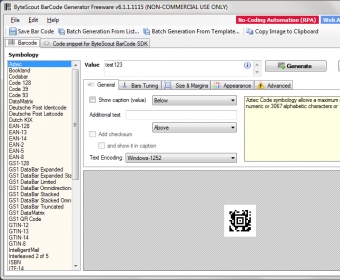
Bytescout BarCode Generator is packed with a comprehensive list of supported output profiles on the left side of the screen. They've sorted alphabetically, so you will easily find the barcode format you need.
The utility also brings you two modes for batch generating barcodes (using a list or a template), various editing options (change the background color, include a caption, resize bars, etc.), and a button for immediately copying the resulting barcode to your clipboard.
In my testing, Bytescout BarCode Generator worked flawlessly. It was very simple to configure, used minimum CPU resources, and immediately exported the barcode images I needed.
Hence, there's nothing bad to say about this Windows tool as it works exactly the way it's advertised on the homepage of the developer. You should give it a try if you need to easily generate barcodes on your PC.






Comments (4)
http://en.wikipedia.org/wiki/ASCII